Core
The local web board
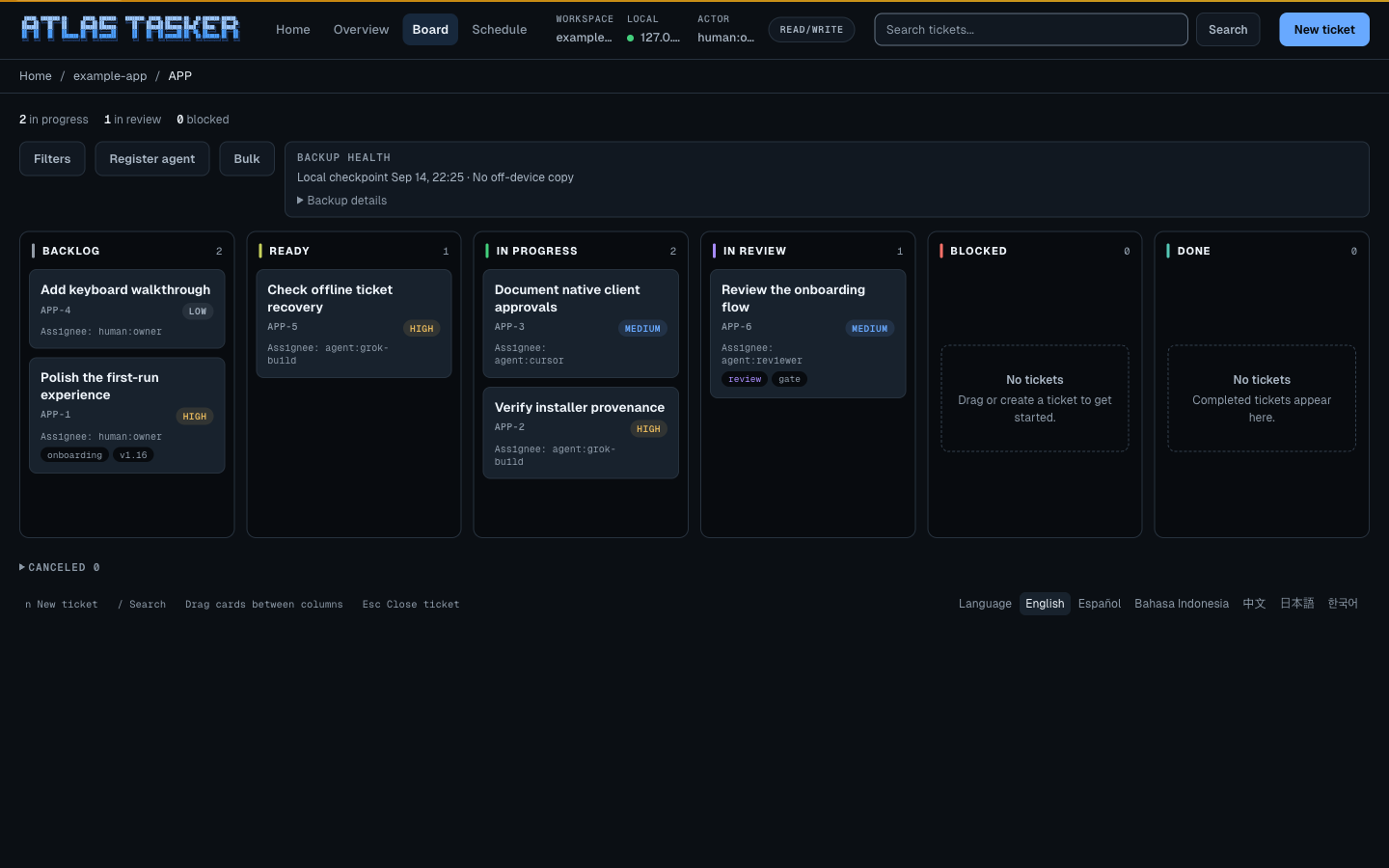
tracker opens Atlas Home on 127.0.0.1:7432. The single-workspace board below is still supported. No hosted server, no second database, no login system. It is a local view over the Markdown snapshots, the event log, and the query index.
Serving
tracker                                       # Atlas Home on 127.0.0.1:7432
tracker web serve --open                      # single-workspace board
tracker web serve --project APP --actor human:owner --open
tracker web serve --read-only --no-browser    # wallboard mode
tracker web status                            # where is it running
tracker web open                              # reopen the last server
- Home binds
127.0.0.1:7432and fails if another app owns that port. Legacyweb servepicks a random free port. There is no non-loopback option. - Home clears a one-time URL fragment and exchanges it at
POST /session/claimfor an HttpOnly cookie. Legacy serve still prints?token=. Home keeps pending claims in private local state until consumed or expired. Sessions persist in private local files, expire, and rotate; workspace session files are excluded from Git. That cookie is essential to the local app; this marketing site sets none. --read-onlyserves the board without any mutation controls: handy for a shared screen.- Runtime status lands, without secrets, under
.tracker/runtime/web/server.json, which is howweb openandweb statusfind the running server.web openopens the same?token=session URL thatweb serveprints, so a fresh browser signs in instead of getting a 401; it prints only the bare board URL.
What you can do on it
- The board shows Backlog, Ready, In Progress, In Review, Blocked, and Done; a disclosure opens Canceled. Done and Canceled stay separate because canceled work neither satisfies dependencies nor counts as completed. Drag cards between legal states: dropping a card on its own column is a no-op, and every move runs the same status-edge rules as the CLI. On a phone the board shows one column at a time and a strip above it switches between them.
- The board uses the available width until you select a card. The ticket drawer then opens over the board, with a full-width layout on phones. Close it with the visible Close link or
Escape. Four tabs group the details: Overview (description, acceptance criteria, schedule, and editing, including saved notes), Notes & activity (comments and history), Policy/Gates, and Evidence. Saving keeps you in the same project. If another session changes the ticket, Atlas shows a conflict and preserves your typed form values for review. - Each card shows its assignee on its face. Hover for a couple of seconds and a preview adds reviewer, priority, labels, and the blocker, gate, and comment counts without changing the drawer.
- Create and edit tickets, assign, claim, release, comment, move through workflow states, and run request-review, approve, or complete where policy allows. For
review_gate, reviewer approval is the transition to Done; it is not followed by a separate completion. Delete ticket usestracker ticket delete(ticket archiveis an alias): confirm names the ticket, history stays, there is no restore. Cancel is a status move, not archive. Show archived work with?archived=1. - Filter by project, assignee, reviewer, label, priority, and type; search; and load saved views. The state lives in the URL, so a filtered board is a shareable local link.
- Keyboard:
nfor a new ticket,/for search. Every drag action also exists as a button for non-drag users.
If a dependency, reviewer gate, owner gate, or read-only mode blocks an action, the page shows the service error instead of bypassing policy and keeps typed values. Stale edits conflict. The board mirrors the tracker; it never gets its own rules.
The other pages
The board lives at /board; the same server renders three more pages:
/is a welcome dashboard: per-project status rollups, blockers, a recent-activity feed, links into each project's board, and project creation when the server is not read-only./scheduleis a week-view workspace for one-time scheduled tickets. New or replacement times must be strictly in the future; an existing schedule can become overdue normally. Pick a runner and a time, browse the week, and "Run due now" triggers everything that is due: human runners get a reminder, agent runners get an Atlas wakeup. Same data astracker scheduleon the CLI./settingsis read-only. It shows the workspace, host, actor, owner name, language, and agent colors the server is running with; changing them still happens throughtracker config.
Languages
The UI ships in six languages: English, Spanish, Indonesian, Chinese, Japanese, and Korean. A switcher in the page footer changes it per request; without it the server falls back to the web.lang config key, then the browser's Accept-Language. Two honest gaps for now: tracker config set web.lang only accepts en, es, and id, so reach the other three through the switcher or browser preference, and the schedule page is English-only.
The board is for humans
There is no API key and no headless mode, on purpose. Agents should not scrape or drive the board; they get the JSON CLI and MCP, which are faster and structured. Browser mutations record surface: "web" in the event log, so you can always tell how a change arrived.
Under the hood
The board uses the same canonical services as the CLI and TUI. Descriptions and comments render as escaped text; raw Markdown HTML is not injected into the page. It is a viewer over your repository state, not a separate application with its own storage.